
Give your clients a window into their portfolio.
AppColl Tandem is the client portal included with AppColl PM Plus. Invite your corporate clients to a branded, no-cost account where they see their matters, deadlines and shared documents, synced from your account. You decide exactly what each client sees.
AppColl Tandem
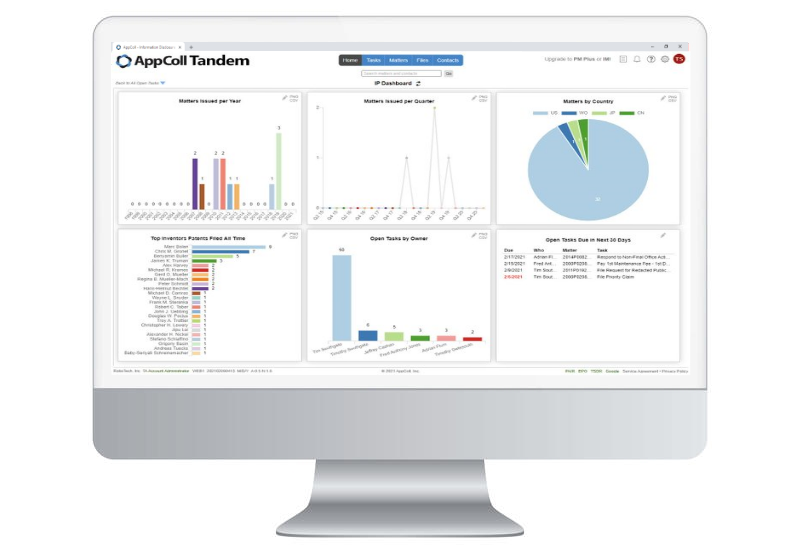
Every client gets a 360-degree view.
01
Matters
Clients see bibliographic data for the matters you handle for them, updated automatically every night.
02
Tasks
Share external deadlines, open and completed, so clients see what is coming without having to ask.
03
Contacts
Inventors, attorneys and other contacts tied to the matters and deadlines you share.
04
Files
Share documents attached to matters and tasks, whenever you choose to.
05
Dashboard
Each client gets six chart tiles on their Home page and can click any chart to see the records behind it.
06
Reports
Clients run their own reports on matters, tasks and contacts, so you field fewer status requests.
WHEN CLIENTS NEED MORE
Room to grow.
Clients who outgrow a read-only view can upgrade their Tandem account to AppColl PM Corporate, with their synced data already in place.
Your clients see exactly what you want them to.
A branded portal where clients view real-time matter status, upcoming deadlines, and shared documents. You decide which fields are visible per client. No more status emails, no more spreadsheets exported on Friday afternoon.
Per-client field visibility, granular control
Branded with your firm's logo & domain
Shadow docketing pushes matters to client accounts
Free for your clients · unlimited seats
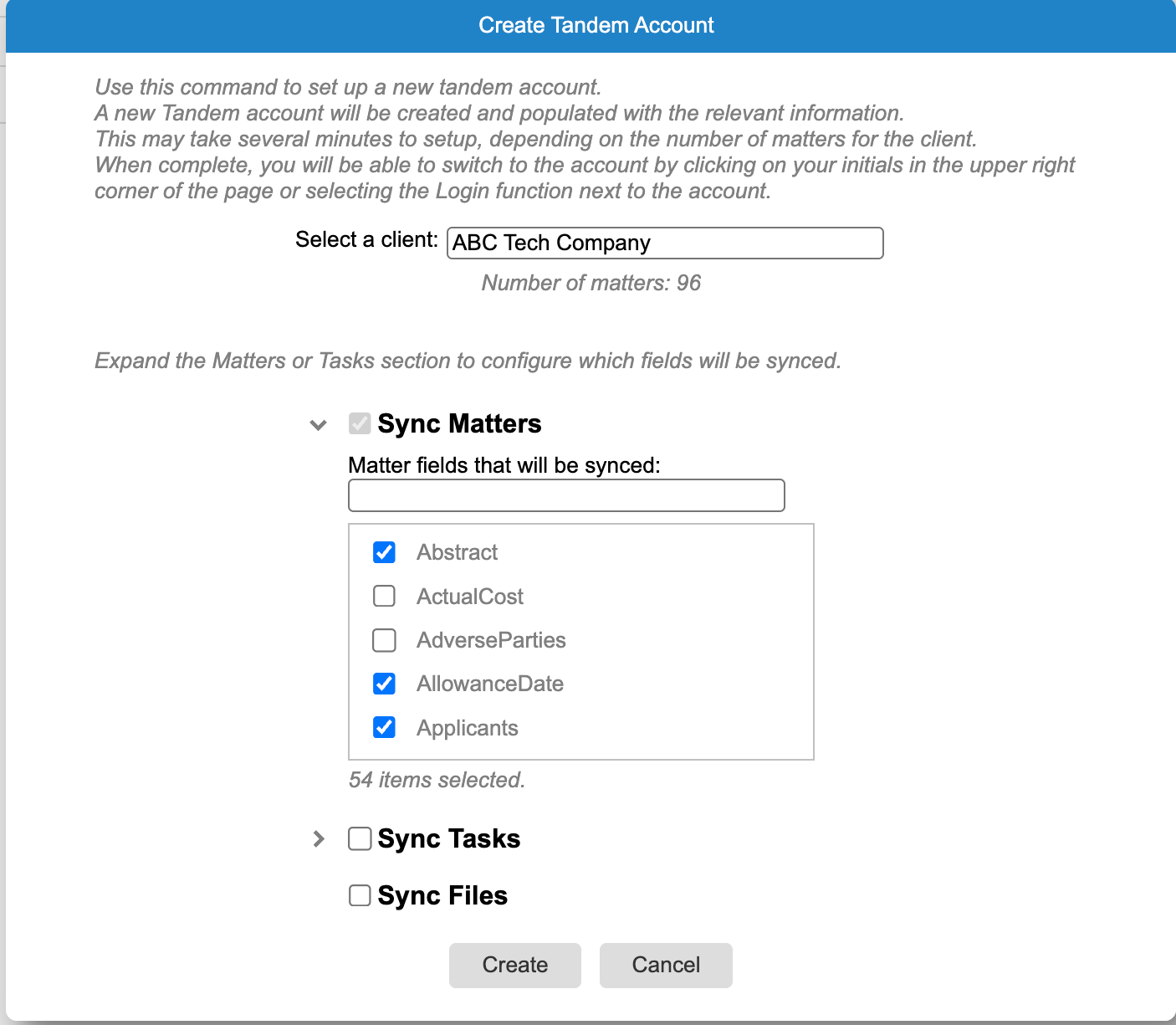
You control the sync.
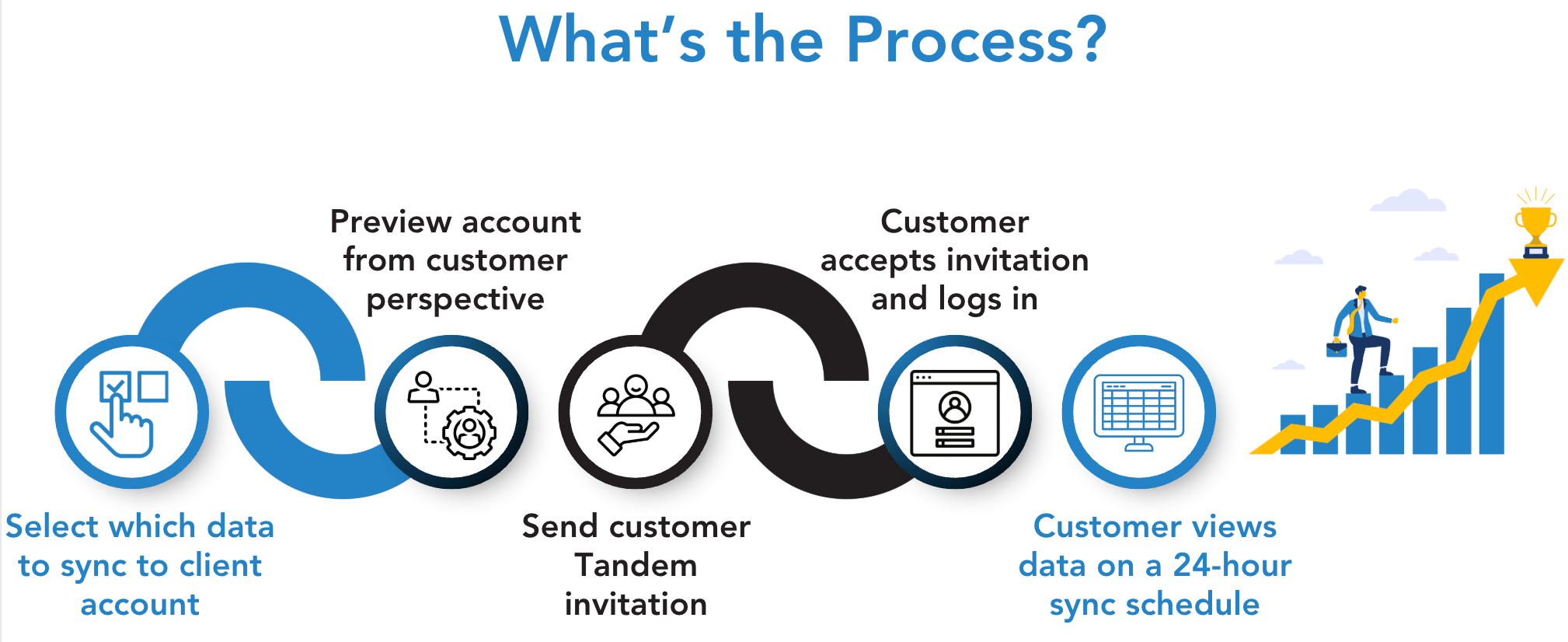
Choose which matters, fields, deadlines and files go to each client's Tandem account, preview the account from the client's side, and adjust or stop the sync at any time. Updates run automatically every night.
Matters and contacts sync automatically
Choose which fields each client sees
Add external deadlines and files when you want
Preview the account before you send the invite
A dashboard your clients actually use.
Every Tandem account opens to six chart tiles, such as matters issued per year, matters by country, top inventors and open tasks. Set up the default dashboard before you send the invite, and clients can click any chart to see the records behind it.
Six customizable dashboard tiles
Set the default dashboard before you invite
Clients download charts as PNG and data as CSV
Click through from any chart to the records


Invite a client in minutes.
Open the Tandem module, pick the client and choose what to sync. Send the invitation from AppColl with your own subject and message, and the client clicks the link to set up their account.
Create the account from the Tandem module
Personalize the invitation email
Clients with several firms see them all in one account
Unlimited logins for every client team
AppColl Tandem
Included with PM PlusA no-cost client portal that comes with every AppColl PM Plus subscription (it is not part of PM Pro). Invite as many clients as you like, at no cost to them.
Branded with your firm's logo & domain
Unlimited clients and client seats
Per-client control over what is shared
Matters, deadlines, contacts & documents
Dashboards & reports for every client
Automatic nightly sync
Give every client Tandem.
Tandem comes with AppColl PM Plus at no extra cost. See how it works for your firm and your clients in a demo with our team.
Already on PM Plus? Invite your first client from the Tandem module →
Have a Tandem account? Upgrade to AppColl PM Corporate →